
Help Center
Importing your Friends list from Facebook
Request your Friends list from Facebook
- Begin by going to Facebook (on a web browser not the mobile app)
- Use this link: Manage Your Facebook Information
- Then click on “Export Your Information”
- Click “Create Export”
- Select your Profile if prompted
- Click “Export to Device”
- Select Date Range: All Time
- Click on Deselect All, below the blue create file button
- Click “Customize Information” and Unselect Everything except: Friends and followers
- Select JSON format.
- Click Request download.
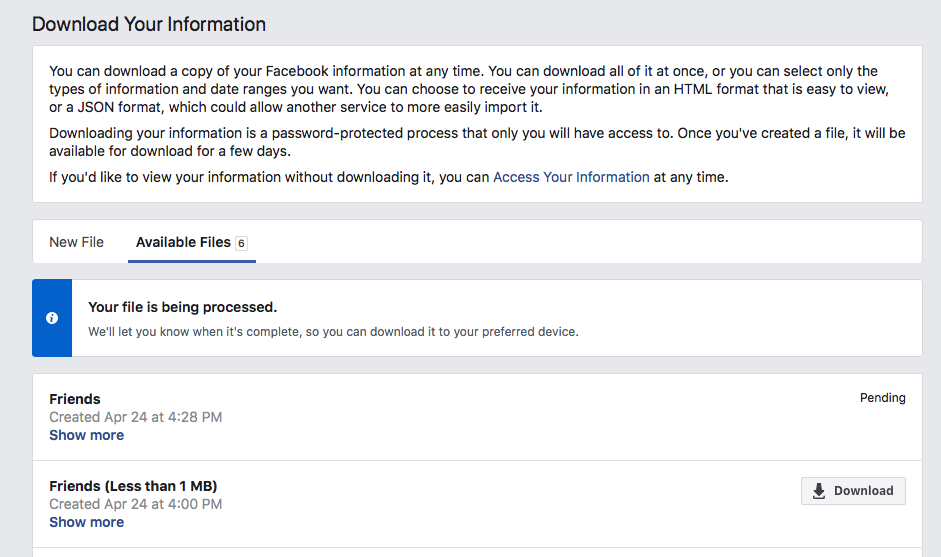
- When your file is ready, you’ll get an email with a link or you’ll see the red notification (1) appear next to Available Files. *This should only take a few minutes.
- Click on Available Files (You’ll be prompted to enter your FB password)
- Click on Download
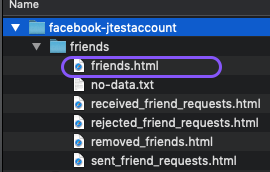
Your download will be a zip folder. First double click to unzip/extract, and then double click the friends folder.
Pro Tip: Try saving the friends.json file to your desktop for easy finding.
Import friends.json file into Teamzy
- Go to Teamzy
- Select +Add Contact
- Select Bulk Import
- Click the Choose File button
- Find and Select the file called friends.json